


InstaVision: Smart & Safe Home
4.51.18K Reviews
App Specs
- Version
- 2026.10.03.1715
- Updated On
- License
- Free
- Downloads
- 100,000+
- Developer
- InstaVision Inc.
- Categories
- House & Home
- Platform
- Android
Screenshots
 Analysis by AppCompare
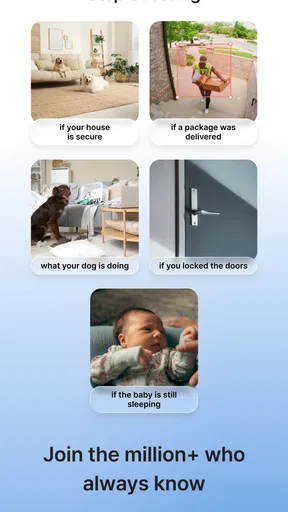
Have you ever wondered what it would be like to keep a closer eye on your home, even when you're miles away? Well, let me introduce you to InstaVision: Smart & Safe Home, an app that's here to revolutionize the way you monitor your personal space. I recently had the chance to dive into this app, and let me tell you, it’s quite the game changer.
Getting Started with Ease
First off, installing InstaVision: Smart & Safe Home was a breeze. You can find it on both Android and iOS, so no worries if you’re team Apple or team Android. The app's design is sleek and user-friendly, which means you're not going to get lost in a sea of confusing options. It’s all about simplicity here, folks!
Once you have the app up and running, it guides you through the setup process like a pro. I had my home cameras connected in no time. The step-by-step instructions are clear and concise, even for those of us who aren't exactly tech-savvy. Plus, there’s a handy FAQ section for any hiccups you might encounter.
The Features That Make It Shine
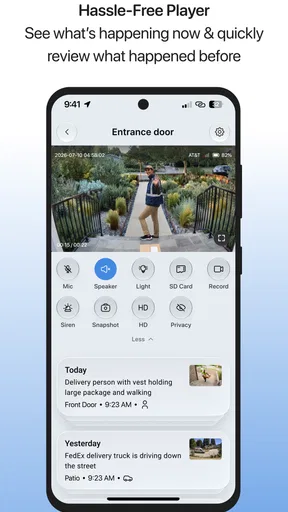
Now, let's dive into what makes InstaVision stand out from the crowd. One of my favorite features is the real-time streaming capability. You can view live footage from your cameras anytime, anywhere. Whether you’re at work, on vacation, or just lounging in another room, you can keep an eye on things with just a few taps.
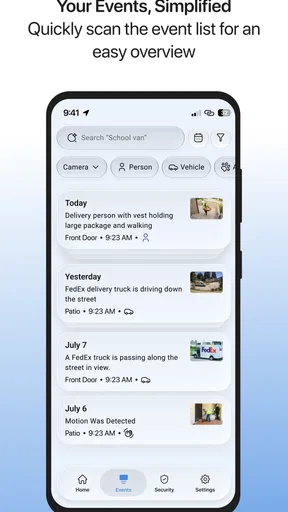
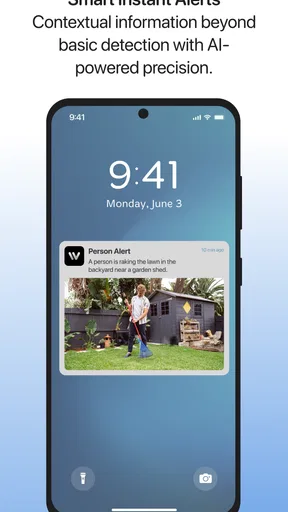
Another cool feature is the motion detection alerts. The app sends you notifications whenever there’s movement detected, which is incredibly handy. Imagine being alerted right away if someone’s snooping around your front door or if the kids have come home from school.
And let’s not forget about the night vision mode. It’s like having a pair of night vision goggles, but way more practical. The clarity is surprisingly good, even in low-light conditions. This is perfect for keeping your home safe 24/7, without ever missing a beat.
Integration and Compatibility
One of the things I found particularly impressive was how well InstaVision integrates with other smart home devices. You can connect it with your smart locks, lights, and even voice assistants like Alexa or Google Assistant. This makes managing your home security a seamless part of your daily routine.
Worth Reading Before You Choose

EA SPORTS FC Mobile 26 Is a Bigger Football Game, but It Takes Time

Flipboard Shows What News Apps Must Do Beyond the Feed

Switching to Android Auto Means Rethinking Your Driving Routine

Google Calendar Makes a Crowded Week Easier to Manage

Ludo King Makes the Most of the Minutes Between Plans

Baby Panda World Brings Quick Play to Modern Phones, but Its Game Library Feels Busy
The app also supports a wide range of camera models, so you’re not stuck having to buy specific brands. This flexibility means you can upgrade or change your equipment without worrying about compatibility issues. It’s a win-win!
Security and Privacy
In an age where privacy is a major concern, InstaVision doesn’t disappoint. The app uses end-to-end encryption to ensure your data is safe from prying eyes. It’s reassuring to know that your video streams are secure and that your peace of mind isn’t compromised.
Moreover, the app gives you control over who can access your camera feeds. You can easily share access with family members or roommates, and just as easily revoke it if needed. This puts the power back in your hands, where it belongs.
Final Thoughts
All in all, InstaVision: Smart & Safe Home is a solid choice for anyone looking to enhance their home security. It’s packed with features that are both practical and easy to use. With its seamless integration and robust security measures, you can rest easy knowing your home is being monitored effectively.
If you’re on the hunt for a reliable and user-friendly home security app, give InstaVision a try. I’ve found it to be a worthwhile addition to my smart home setup, and I’m sure you’ll feel the same. Ready to explore more? Check it out on your app store and take the first step towards a smarter, safer home.
Pros
- User-friendly interface for easy navigation.
- High-quality video streaming with minimal lag.
- Seamless integration with smart home devices.
- Customizable alerts for enhanced security.
- Supports multiple user accounts for family use.
Cons
- Subscription required for advanced features.
- Initial setup can be time-consuming.
- Limited compatibility with older devices.
- Occasional connectivity issues reported.
- Customer support response can be slow.
FAQs for InstaVision: Smart & Safe Home
What features does InstaVision: Smart & Safe Home offer?
InstaVision provides a comprehensive suite of features designed to enhance home security and convenience. It includes real-time video surveillance, motion detection alerts, remote access via smartphone, and integration with other smart home devices. Additionally, users can benefit from cloud storage options and customizable security settings to suit individual needs.
Is InstaVision compatible with all types of smart home devices?
InstaVision is designed to be highly compatible with a wide range of smart home devices. It supports major platforms like Alexa, Google Home, and Apple HomeKit, enabling seamless integration into existing smart home ecosystems. However, users should check specific device compatibility on the app’s support page to ensure optimal performance.
How secure is the InstaVision app in terms of user privacy?
User privacy is a top priority for InstaVision. The app employs advanced encryption standards to protect data transmission and storage. Users can also set up two-factor authentication for an added layer of security. Regular updates and security audits are conducted to address potential vulnerabilities and ensure user data remains safe.
What are the subscription options for InstaVision?
InstaVision offers both free and premium subscription plans. The free version provides basic features like limited video storage and standard alerts. For enhanced functionality, users can opt for premium plans which include extended cloud storage, advanced analytics, and priority customer support. Pricing details can be found in the app's subscription section.
How user-friendly is the InstaVision app for beginners?
The InstaVision app is designed with user-friendliness in mind, featuring an intuitive interface that guides users through setup and daily use. Comprehensive tutorials and FAQs are available within the app to assist beginners. The simple navigation and user-centric design make it accessible even for those new to smart home technology.


